I hope you find my writing and business tips and observations useful. My business and blog are dedicated to helping businesses communicate clearly and reach their potential.
Read, and enjoy!Tash
Aside from the need to capitalise certain letters, changing the case of words can be used for emphasis and differentiating headings. However, within a document, all headings should use the same case style.
Case for a letter simply refers to whether it is a capital or upper case letter (ABC) or lower case letter (abc).
Case style options in headings
When using headings in documents, it is usual to make the headings a bit different to the general text. One way of doing this is to adjust the capitalisation of words in the heading.
Let’s start by saying that using all capital letters (upper case) in a heading is not recommended. It is harder to read and can be interpretated as shouting or yelling at your reader.
The opposite is to use all lower case letters. This is simple and very effective if used as part of a brand style. However, it does miss basic grammar and gets trickier if your heading includes a word that needs a capital. For instance, would that style use “catching a melbourne tram” or “catching a Melbourne tram”?
There is a traditional option called Title Case. For this, every key or functional word in a heading starts with a capital letter which helps make the heading stand out and have a little more weight than the general text. Words like of, and, or and for usually are in lower case for this style. Personally, I don’t think this adds enough value to warrant typing all those capital letters! And I do not like title case for content underneath headings – it is distracting.
So that pretty much leaves us with sentence case for headings. Sentence case is as you’d expect – only using a capital letter at the start of the sentence and for proper nouns. This is easy to write and read. It is also easy to remember as your style – I have seen documents where headings vary cases because the style is forgotten in the course of writing the document.
There are other case styles but they are not used as heading styles.
Consistency looks much better
It is distracting and looks unprofessional to use different case styles in headings (and content) of a document or website. Using the same base style gives a consistent look and allows the content to shine rather than the formatting.
Look at the options – lower case, title case and sentence case – and decide which one suits you and your business or document. Then make that a rule. That rule needs to be added to your style guide – or used as the start of a style guide if you don’t have one.
If need be, adjust the heading settings in your software so H1 and H2 will always present the same way without any additional effort from you.
Heading style vs heading content
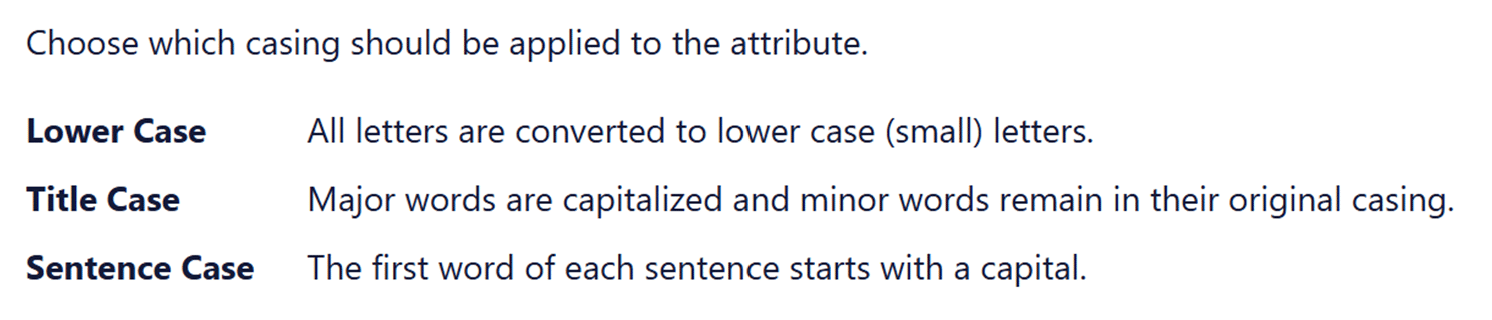
Recently, I was adjusting some settings and was given the choice of case style in headings.
In this case, the three styles presented consistently, as did the descriptive text of the styles. Yet it felt wrong as the words and content were clashing – lower case and Sentence case were written in Title Case. This is one time where changing case of the options would have helped illustrate the differences. Would you prefer the consistency here or the visual aid of explaining the options?
However, this example also lacked clarity in the definition of title case.
what is a major word and what is a minor word?
‘remain in their original casing’ could lead to a mess. Imagine I type or paste in some headings in upper case and some in lower case – does that mean some minor words will keep that format? I would trust the process better if it stated ‘minor words are in lower case’.
Headings (or titles) to blog posts and other online articles are important.
A good heading will entice people to read the post which means they will click on a link to it as well. So write a good heading not just within your blog but in the title you use for links to your blog post.
Anybody looking for information on a specific topic will be attracted by seeing those words in the heading. It will also stop uninterested people clicking through to your post (and this is a good thing if you are trying to reduce your bounce rate and not waste time and bandwidth on people who are not your potential customers anyway).
Including subject words also helps search engines summarise your blog post and determine its importance and relevance for any specific search term.
Here are a few examples to show how a subject word can help:
What I’m reading vs My top business books
Preparing dinner vs Planning nutritious meals
My hobby vs Bike riding for fun
Which of these headings do you think will show up in search engine searches for business books, healthy cooking and bike riding?
The headings you use in blog posts, tweets, articles, ads, media releases and the like are a critical aspect of your ongoing success. This also includes sub-headings, titles of tables/images and other stand-out text.
Busy people will only read on if the heading promises something they value right now.
People surfing the internet will only read more if your heading catches their attention, and holds it.
So it is worth putting some effort into making your headings enticing so you maximise the number of people reading whatever your heading leads to. Here are some tips on making your headings more effective:
where feasible, use ‘you’ to personalise and catch attention. It also helps you to remember to make your message aimed at your audience
apply ample alliteration 🙂 Repeating a letter is attention grabbing which gives your headings more impact.
use questions – it is like building some suspense as people are interested in learning the answer
be interesting or unusual, possibly even a little controversial, within the bounds of the message and brand you are portraying. This can be as simple as choosing a less common word such as Clydesdale instead of horse or scoop instead of update, or taking a different approach to a common subject (eg. ‘finding quirky blog content ideas’)
keep it short – two-part and too long headings are not as visually appealing and don’t belong in any form of marketing, especially not digital media where short works best (consider the 140 character limit on Twitter!)
Can you remember any effective headings? Do you know why it was effective?

 Busy people will only read on if the heading promises something they value right now.
Recent Comments