I hope you find my writing and business tips and observations useful. My business and blog are dedicated to helping businesses communicate clearly and reach their potential.
Read, and enjoy!Tash

Outsourcing gives control, rather than takes it
Outsourcing means getting someone else to do a task (or tasks) for you so you can spend time doing other things; as a sole trader it is pretty much mandatory to outsource to succeed.
Sounds like a strong statement?
It is a strong statement but that doesn’t stop it from being true.
Small business people have a lot to do
There are many tasks that need to be done to keep any business running – accounts, invoicing, customer service, marketing of some sort and general admin are the minimum. Then there’s the specific work of that business plus managing a website and additional marketing.
And the list keeps growing. With the introduction of blogs then social media (and more and more platforms), businesses have more tasks to add to the daily to do list than ever before. Even if you aren’t doing much on social media, you should be aware of it so you are deciding to not use it (rather than just ignoring it) and monitoring it is a good idea, too.
When there’s only you, there is a big pressure to stay on top of everything and be in control. Let’s face it, there is no one else to pick up any slack, is there?
Handing over tasks

A conductor controls an orchestra without being the orchestra – outsourcing makes you the conductor of your business
Earlier this year, Jane Shelton blogged ‘You can maintain your sense of control by outsourcing many of the routine elements of your business.’ Outsourcing does not have to mean giving up control of your ‘baby’.
Think of tasks left undone or ideas not followed up on because there is no time.
Think of those tasks done in a rush rather than with care and attention because the to do list is so long.
Think of the last time you planned your week’s activities rather than swayed from one urgent activity to the next and hoped for a moment of breathing space.
Still think outsourcing takes away control?
Outsourcing simply means choosing which things to get someone else to do – either to save you from boredom, save you time or to gain expertise and skills you just don’t have.
For example, I outsource my filing (to my daughter!) which I find boring, my bookkeeping to gain back time and any design work as I don’t have those skills. So I can focus on writing for clients, advising clients and caring for my business.
Choose who you outsource to and you still control the outcomes. If you want, outsource most of a task and finish it off yourself if that feels better – but I bet you’ll soon give the entire task away!
What do you do?
List all the tasks you do for your business. Yes, all of them.
Long list?
Categorise them (the list Jane gives in the afore-mentioned blog post is a good system).
Now, sit back and imagine your business life if you had an extra two hours a week…
How would you spend another four hours a week in your business? How much would your profits grow by?
Want to keep that dream and feeling alive? Outsource something – just some little task so it doesn’t feel like you’re handing over your baby. Maybe get your account data entry done, ask for a blog post to be written or have your office cleaned by someone else.
Then you just have to keep on taking baby steps until you have outsourced enough to regain control of your business.
So the only question left is what will you outsource first?
I assure you of the meaning
Today’s Monday Meanings is an interesting set of words.
All three words have a similar sound and very similar meanings – they all relate to making certain and secure. However, they are generally used in different contexts.
Assure: speak positively to convince, make certain, make safe, ensure
The police will assure the family that all is being done.
The CEO will assure this job is yours once she returns from lunch.
Ensure: make certain, make safe, secure
Preparing a first aid kit will ensure a safer trip.
Insure: to guarantee or provide indemnity against harm or loss, usually in the form of money
I pay a premium so the company will insure my business against theft and fire.
So which word to use when?
insure is used where financial matters are involved – relate insure and insurance basically.
assure is mostly used on connection with people or other living things (a for assure and a for alive can help remember this one!) – ‘I assure you’ – and can be related to reassure
ensure is more about events and things – think of ensure as a guarantee that something will happen
Have a go yourself…
Here are some examples for you to try the three words in…
Mary wants to ……. her business equipment.
Jane will …….. the blog posts are uploaded on time.
Ashton hastened to …….. staff that their jobs were secure.
The leader carried an extra blanket to …… the cubs were warm.
Comedy writers ……… readers of a laugh.
Not all companies will …….. a sole trader business.
* Image courtesy of 123rfBuilding your social media profile the nice way
 In my latest newsletter, on Facebook and Twitter, I have mentioned some great advice I heard from Gihan Perera in a webinar a couple of weeks ago. Namely,
do something nice for someone on social media every day.
Such a simple concept with the potential benefit of making people feel good and remembering your positively, and giving you inspiration to maintain your social media presence (without being a sales pitch). It also makes you feel good, expands your creativity and shows your generosity.
Not sure of how to do this?
Nice social media activities
Here is a list of things I have thought of, but I’m sure you could add more to this list…
- retweet interesting tweets
- leave comments on blog posts you read (hint hint!)
- answer questions on LinkedIn, even if its just your opinion rather than your expertise
- give someone an online testimonial (LinkedIn is great for that, but why not try Facebook, twitter, Tumblr or their own website? Or maybe compliment them in many places!
- answer questions in a forum
- share the link to a great blog post or article
- write a blog post and link back to someone else’s blog or social media profile
- if you see an opportunity to promote someone, do it (for example, if a relevant site accepts recommendations or links, suggest someone else)
- give support to someone in a forum
- ‘pin’ someone’s image or infographic
- introduce people in your networks (via email or through platforms like Facebook and Twitter)
- add a comment or favourite a YouTube video or a Slide Share presentation
- share a random link with your social media audience – show support for a charity, a good resource or someone who needs a boost
- forward an enewsletter to someone who would appreciate it
I’ve created a pdf of these ideas but I will update it next week when I have more ideas added to the list – share your ideas as a comment and I’ll include your name with your ideas.


Make your website more accessible
Following on from the Canadian court case and why accessible websites are a good objective, it’s time to share idea on how to make site accessible.
Principles of accessible websites
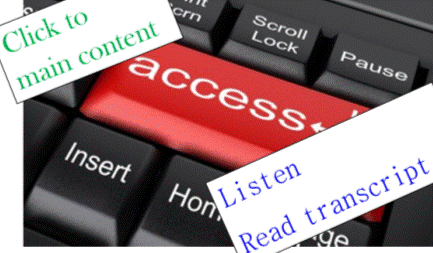
According to WebAIM (Web accessibility in mind), the key aspects of an accessible site are:
- appropriate alternative text (ie alt tags for images and graphics)
- headings for data tables (ie appropriate table headers in the code, using <th>, not just titles in columns and rows)
- ensure forms have labels for every field (ie use
- use meaningful text for links so they can be used out of context (ie don’t use ‘click here’ and ‘read more’)
- add captions and transcripts for audio materials (including videos)
- make attachments (eg a pdf, doc or Powerpoint document) accessible too or convert them into an html format
- enable people to skip repeated content (such as navigation menus that are on every page)
- don’t rely on colour or font changes to convey meaning
- make content clear and easy to read
- be careful with the use of JavaScript – make it usable without a mouse and make pages work without JavaScript
- design to w3c standards – CSS sheets help readers separate out presentation details from the content; html pages are easier and actually more SEO effective
Following these principles
Making your website accessible makes sense.
The principles are fairly simple and non-expensive to follow. I know I adhere strongly to some of them – and others I just didn’t know or think about. And some aren’t so relevant (for instance, I don’t use JavaScript on my site).
Which of these principles do you follow all the time? Which did you not realise were possible or an issue?
I know it will take me a bit of time, but I am going to work my way through that list (well, the ones I haven’t done in the past) so I can learn how they work and implement them. Starting with form labels and table headers as I didn’t know these existed before now.
As I learn more, I will share that knowledge – the more awareness we share, the more we can make the internet accessible and inclusive. Will you help make it so?
Why should your website be more accessible?
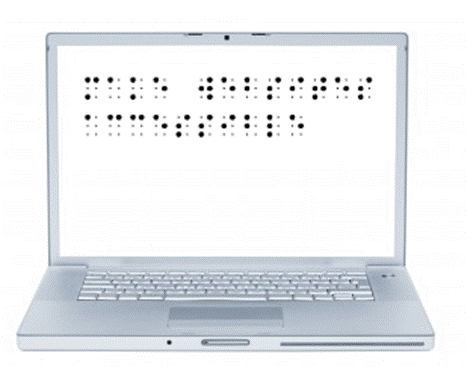
‘make websites accessible’ in braille
Why wouldn’t we want to make our website accessible to all sorts of people, including people with limited abilities (such as visually or hearing impaired people)?
I read yesterday that a court case in the USA is showing that many sites are not easily accessible to the disabled (visually impaired people on this specific case) and may actually be breaking the law by excluding accessibility considerations. Legal aspects of accessibility I know nothing about, but morally and from a business perspective, I know an accessible site is a good aim.
Why make your site accessible?
Well, why not really?
The obvious answer is that the more accessible your site is, the more people can visit it and so you increase your sales or influence by having a bigger audience. Making it accessible also builds trust and credibility for you and your brand.
Also obvious is that you are welcoming all people and being a decent human being to not make life harder for certain groups.
Would you build a cafe and not have a ramp for wheelchairs/prams or refuse to describe your menu to someone who couldn’t read it? Of course not, so why not do the same with a website?
Computers can do many things these days, so don’t assume a blind person can’t read websites so doesn’t go online. There are tools that read webpages to the blind. There are anti-spam tools that rely on audio for those who can’t read the captcha images. Text on websites can be expanded to be seen by those with limited vision.
And so on.
For someone who finds it difficult to hold a book or turn pages of a magazine, how much easier is it to move a mouse and read on a screen? Or use a verbal command to flick between webpages?
Just like a computer reading a webpage is easier than getting someone to read to you if you have limited vision.
Or a website offering written transcripts of speeches and presentations enabling the deaf to know what’s going on.
Or being able to search for a website that offers an understandable version of something for anyone with intellectual disabilities.
We can make life easier for people

The internet has opened so many doors for us as a society.
As website owners/managers, we can open those doors further by making our websites accessible to the disabled.
I have long added alt tags to images, for example, so a visually impaired person can be told what the image is about.
There are other things that are easily done that I wasn’t aware of. Now I am aware, I will start implementing them.
My next post will list some of the ways we can make our sites more accessible.
But what do you do on your website(s) to make it W3C compatible and accessible? Why do you make it accessible, even to a small extent?
Making procedure manuals accessible

How many picture a 'manual'
Looking back at what I’ve written in previous June, I came across a post from 2011 about making manuals less intimidatingand therefore simpler to use.
A manual or instruction guide is just a collection of procedures. If each procedure is written well, they are useful documents to have in any business.
Once people are used to having good procedures to follow, it is a simple step to make manuals accessible rather than intimidating and officious.
Manuals can be presented in many ways
Even to me, the word manual conjures up images of big heavy folders, covered in dust, and difficult to use.
There is no need for all your procedures to be kept in a heavy (or light!) folder. Make it more accessible with any or all of the following ideas:
- put individual procedures where they are used. So the procedure for how to use a piece of equipment is stuck on the wall near that piece of equipment or inside it’s case if the equipment is portable
- make the procedures available in soft copy in a series of folders – looking in an electronic folder is something most people are now used to while hyperlinks and search functions make it even easier to find the right procedure
- for procedures you do need to print out, put only related procedures in each folder so they can be stored where needed and handled with ease
- think about other ways to have all procedures (and perhaps your policies as well) together. Maybe a tablet or e-reader would be more useful in your situation – there is a search function, version control is easy and the collection is light to carry around and use
What creative ways can you think of for presenting procedures in your business?
Agreeably in accord
Constantly confused by letters and similar sounding words? Then read on, learn new definitions and relax!
consonance [noun]: agreement or harmony of the parts of a whole; the repetition of consonants, usually for the key syllables of words or in key words of the writing – often used in poetry
Consonance of words, tone and meaning makes good writing better.
Click-clack, click-clack, the train runs along the track. {note the repeated ck sound)
consonants [noun ]: letters other than vowels ( so not a, e, i, o or u) – more technically, these are the letters which require at least partial closing your vocal tract to say them.
There are 21 consonants in the English language, although Y can act as a vowel and W acts as a vowel in Welsh.
consonant [adjective]: in harmony or agreement
Consonant with the company’s brand, the salesman promised quickly delivery
Is your business prepared for 2012-13?
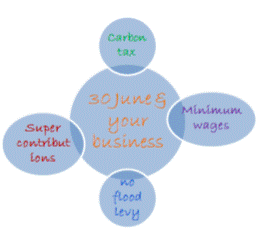 With one week to go in this financial year, I thought it a good time to remind you of some changes that come into effect on 1 July.
- the carbon tax starts – find out more about pricing impacts on the ACCC website
- minimum weekly wages increase by 2.9% so if you employ anyone at minimum rates (including apprentices, trainees and juniors) make sure you are meeting the Fair Work Australia requirements
- new individual PAYG tax rates change – namely the tax-free threshold is increasingly significantly. Make sure your payroll software has been updated with the new rates before your first pay run
- the flood levy finishes on 30 June so if you have been deducting this from employees’ pays, remember to stop!
- the superannuation co-contribution rate is halving to $0.50 per $1 you contribute, so if you qualify this year, you have a few days left to make a personal contribution to get this
- concessional superannuation contributions (those from your employer, salary sacrifice or that you claim a tax deduction on) will be capped at $25,000 regardless of your age or situation. Check your contribution rates for 2012-13 so you don’t get any nasty tax surprises…
Have you implemented all of the relevant changes for your business?
If you’re looking for some tips for the end of financial year, some of my previous posts may help:
Preparing for the end of financial year
Maximise your 30 June position
Keeping your accounting issues under control
Understanding profit and paying yourself
Develop a simple internet marketing strategy
Last week, I participated in a webinar by Gihan Perera, author of Fast, flat and free: how the internet has changed your business.
There were two things from the webinar that I wanted to share (as well as all the tips I tweeted during the webinar!) – the first being the basic aspects of an internet marketing strategy:
- create
in other words, get a website and get online! Be it a static one page site, a blog or a fully interactive site with hundreds of pages, until you have a site it’s hard to market online - generate
write some content – preferably good content and lots of it. Put content onto your website and/or blog plus in a newsletter, webinars, podcasts and on sites like YouTube, Pinterest and Slideshare - share
let people know about your content, with the key method being social media links. Gihan suggested automating this as much as possible to save time and ensure it is done, and I agree - participate

get online and join in conversations! So visit other websites and comment in blogs, add reviews, join forums, respond on Facebook, tweet and retweet, answer LinkedIn questions, share interesting things and so on. This step is necessary to engage with other people and should take a large proportion of your marketing time
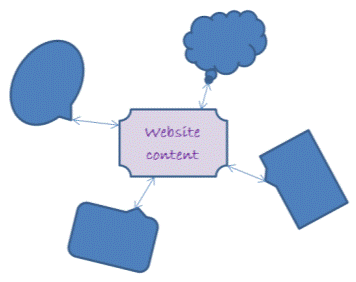
When you think of it as four simple steps like this it is a lot less intimidating and a lot more achievable, don’t you think? And it is realistic to think of it this simply rather than worrying about a big picture that overwhelms you.
I also like the priority of generating content before you get caught up in marketing and building links – I honestly don’t think you can build a strong foundation online until you have decent content that people will want to use – and share.
So now’s your chance – add a comment to this post to boost your internet marketing and share you ideas. It’s easy, I’ll answer you and you will get a ‘dofollow’ back link so – what do you think of Gihan’s internet marketing plan?
Is anything worse than doing your worst?

Get clear about what is worst!
With only one letter difference, today’s words are related but subtly different – and just sound wrong when used in the wrong context. Thanks to Entrapment’s comment a week or so ago, here are my definitions of worse and worst.
Note that both of these words can be used as an adverb, adjective or noun (and worst can also be a verb) so I have given all definitions.
worse:
[adjective] of a lower quality or standard The sight was terrible, and the smell worse!
[noun] more unfavourable or desirable Worse was yet to come!
[adverb] showing less skill or ability She had worse handwriting than you!
worst:
[adjective] the lowest quality or standard The hotel last night had the worst service.
[noun] the most unfavourable or desirable He was yet to face the worst.
[adverb] the most adversely or severely Marytown was the worst affected in the fires.
[verb] completely or thoroughly defeat He came out of that the worst.
The key difference to remember is that worse is poor while worst is the poorest possible. For instance, the flu is worse than a cold but pneumonia is the worst of the three.
Just to twist things a little, do you often think about the worst parts of your business, or concentrate on the best?
Recent Comments